KDP Tools on
Every Amazon Page
Modelled BSR ranges, heuristic niche scoring, KDP metadata handoff, and calculator prefilling from supported Amazon pages. Fewer copy-and-paste steps.
See It In Action
Hover over any Amazon book page to see instant BSR analysis and sales estimates
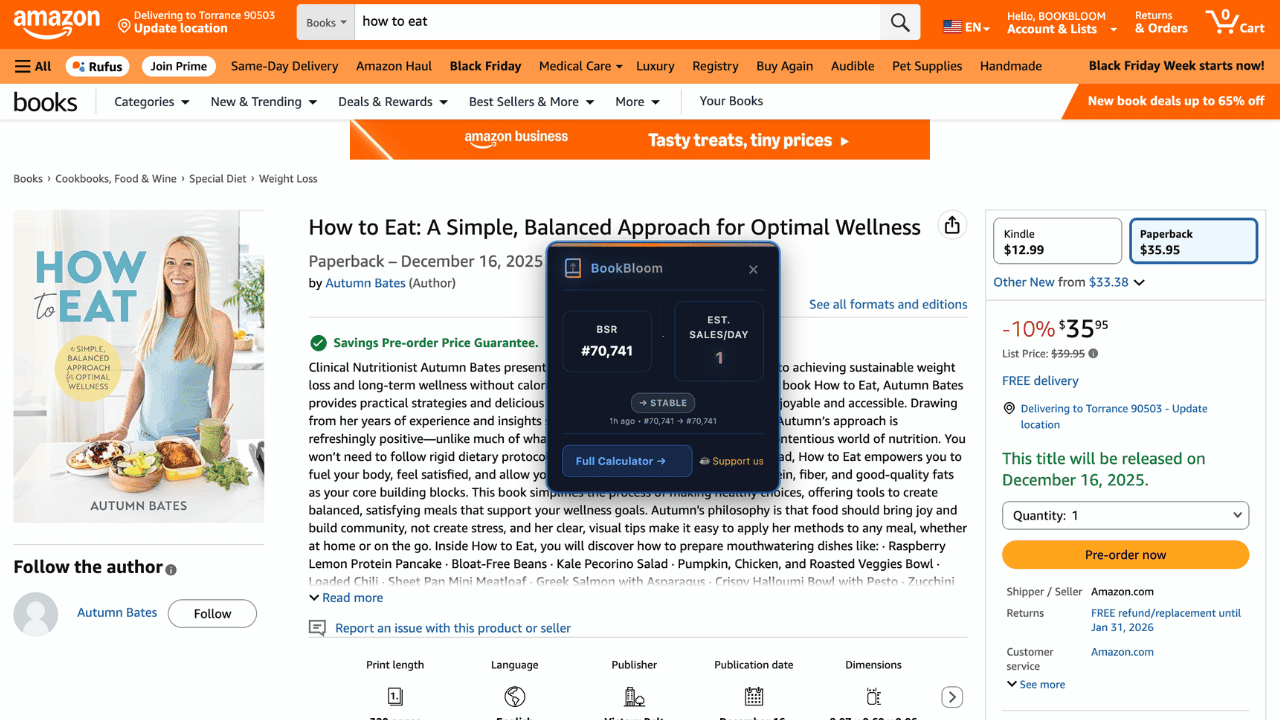
Instant BSR
See sales estimates on hover
Auto-Extract
Format, price, marketplace
One Click
Open full calculator
Niche Analyzer on Search Results
Search on a supported Amazon storefront and get a heuristic score from competition, KDP price/royalty-band alignment, and recent-publication signals
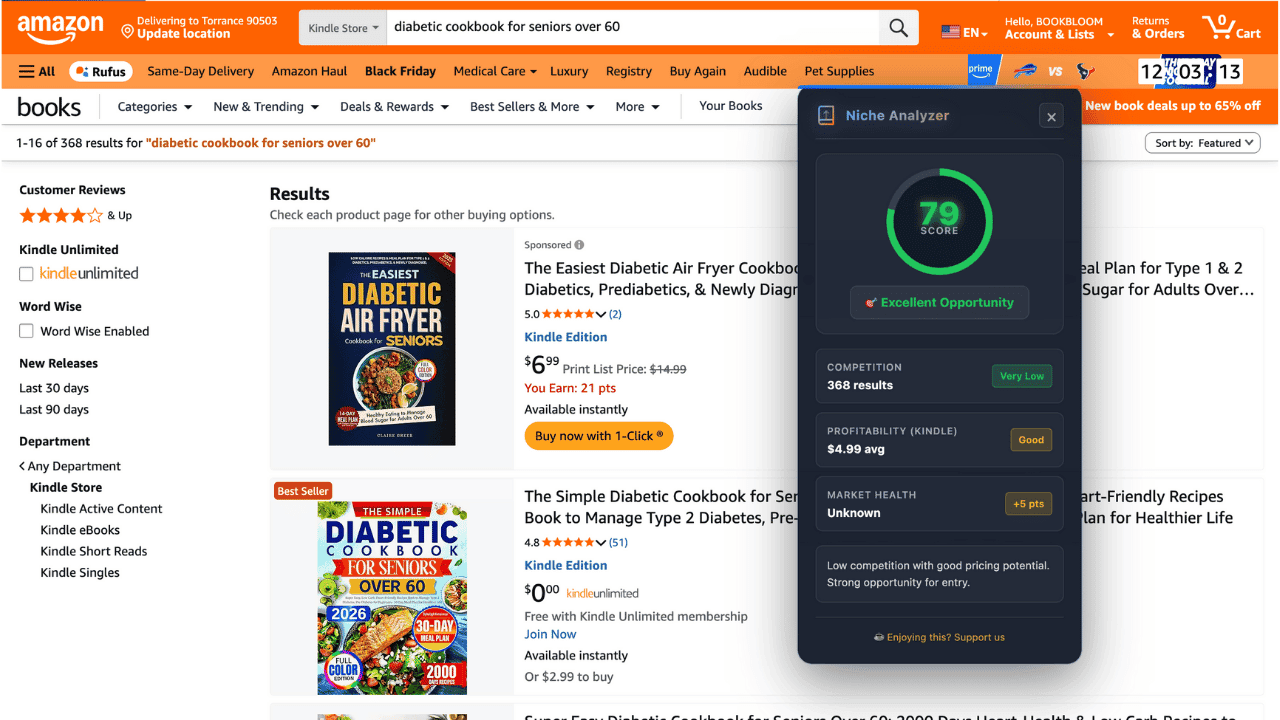
Viability Score
0-100% niche rating
Demand Analysis
Based on sampled search-result signals
Instant Insights
Competition, KDP price-band & recency signals
Powerful Features, Zero Hassle
Everything you need to research books faster and smarter
Instant BSR Analysis
See a modelled daily and monthly sales range on supported Amazon book pages without manually copying BSR into a calculator.
Niche Analyzer
Analyze supported Amazon search results with a 0-100 heuristic score based on competition, marketplace-aware KDP price/royalty-band alignment, and recent-publication signals.
One-Click Compliance
Send detected title, subtitle, description, and keywords from your KDP edit page to BookBloom for a compliance-risk review.
Auto-Prefill Calculators
Prefill supported fields such as BSR, price, format, marketplace, and page count when the extension can detect them.
Privacy-First
On-page analysis and usage counters stay local. Data is sent to BookBloom only when you explicitly open a prefilled BookBloom web tool.
Get Started in 3 Simple Steps
No BookBloom account required to install the extension
Install Extension
One-click install from Chrome Web Store. No signup or configuration needed.
Visit Amazon
Browse any book page on Amazon.com. The extension activates automatically.
Get Instant Insights
See a modelled BSR sales range. Open the full calculator with supported detected fields prefilled.
Everything You Need, All in One Place
Frequently Asked Questions
Everything you need to know about the extension
Is the extension really free?
The Chrome extension is currently free to install and does not require a BookBloom account to install. Linked BookBloom web tools may have their own access or verification requirements.
Does it collect my data?
The extension keeps on-page calculations, settings, and local usage/history data on your device. When you explicitly open a prefilled BookBloom tool, the detected values needed for that handoff are included in the BookBloom URL and are then handled by the website under its privacy policy.
What features does the extension have?
The extension provides on-page BSR estimates, heuristic niche scoring on supported search results, KDP metadata handoff to the compliance checker, calculator prefilling for supported detected fields, and quick links to BookBloom tools.
Which websites does it work on?
The current manifest supports Amazon.com, Amazon.co.uk, Amazon.ca, Amazon.de, Amazon.fr, Amazon.it, Amazon.es, Amazon.com.au, and kdp.amazon.com.
How do I install it?
Click the "Add to Chrome" button above. You'll be taken to the Chrome Web Store. Click "Add to Chrome" again, and you're done! The extension works immediately.
Will it slow down my browser?
Its content scripts are limited to the supported Amazon and KDP domains rather than running on every website. As with any extension, actual browser impact can vary by page and device.
Can I use it with other extensions?
It is designed to coexist with other extensions, but BookBloom cannot guarantee compatibility with every extension or every Amazon page modification.
Add BookBloom to Your KDP Research Workflow
Install the extension and reduce manual copying between supported Amazon pages and BookBloom tools. The extension is currently free to install.